Help Support
How to request password reset
| We are no longer able to reset passwords over the phone, the correct procedure to have your password reset manually is either in person with “Picture ID†or via a helpdesk ticket created by any VIDE staff member/co-worker. We are asking users to reset their password online using the “Password Reset Tool†(passwordreset.vide.vi). |
There are two options to request a manual password reset, either using a VALID VIDE account and create an HelpDesk ticket or send a email.
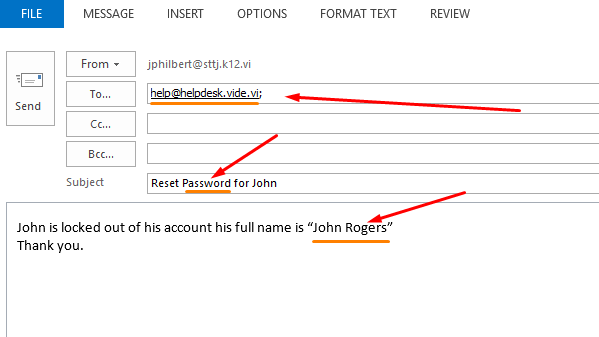
If you still have access to your VIDE email account you can send an email to the helpdesk or have a coworker with a VIDE account send an email on your behalf ... example below.
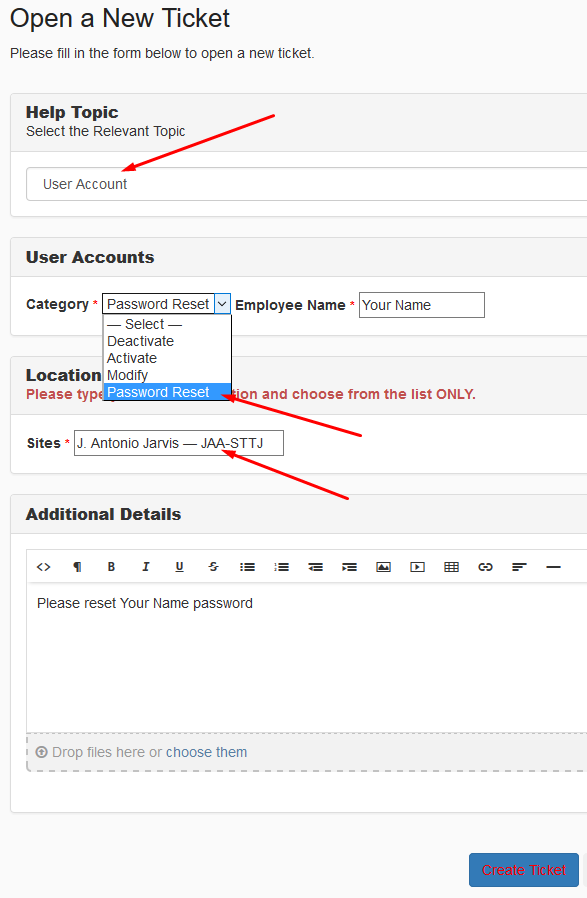
A helpdesk ticket can be created by any user with a VALID VIDE account by going to http://helpdesk.vide.vi and login with a VALID VIDE account.
Then simply create that ticket... example below.
Once the ticket is created make sure you keep checking for a response via email from the person who sent the password reset request. Usually this type of request is handled within the hour or up to 3 hours depending on staff availability.